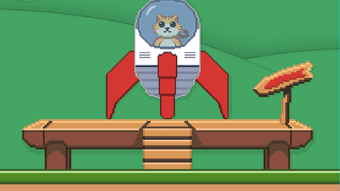

RocketCat: A Physics-Based Puzzle Adventure
Übersicht
RocketCat ist ein kostenloses Puzzle-Adventure-Spiel, das physikbasierte Mechanik mit verspieltem Design kombiniert und den Spielern eine einzigartige Herausforderung bietet, bei der eine raketenbetriebene Katze in den Himmel geschossen wird. Das Kernziel des Spiels besteht darin, durch 20 zunehmend komplexe Level zu navigieren, Sterne zu sammeln und die Rakete erfolgreich anzudocken. Die Spieler nutzen die Pfeiltasten – oben, links und rechts – um die Rakete zu steuern und verlassen sich dabei auf Richtungsanzeigen, die ihre Bewegungen leiten.
Die lebendigen, farbenfrohen Grafiken tragen zu einer leichten, aber fesselnden Atmosphäre bei und verstärken das Eintauchen in allen Leveln. Das Spiel richtet sich sowohl an Puzzle-Enthusiasten als auch an Gelegenheitsspieler und spricht diejenigen an, die strategisches Denken, präzises Timing und wiederholbares Gameplay schätzen. Die Spielstruktur unterstützt unbegrenzte Wiederholungen, wodurch es trotz seiner Schwierigkeit zugänglich bleibt.
Praktische Nutzungsszenarien umfassen kurze Spielsitzungen während Pausen, das Training von präzisionsbasierten Steuerungen und Unterhaltung für Fans skurriler, einfallsreicher Spiele. Der Entwickler hat keine zusätzlichen Hintergrundinformationen bereitgestellt. Zukünftige Updates werden voraussichtlich neue Level und Anpassungsoptionen einführen, was ein langfristiges Engagement signalisiert.
Hauptfunktionen & Fähigkeiten
- Physics-Based Rocket Controls: Players manipulate the rocket using up, left, and right arrow keys, with movement governed by realistic physics. This demands precise timing and spatial awareness, especially in tight spaces.
- Progressive Level Design: The game features 20 levels that increase in difficulty, introducing new obstacles, tighter pathways, and more complex navigation challenges as players advance.
- Star Collection System: Each level includes hidden stars that must be collected to achieve full completion, encouraging exploration and multiple attempts to master routes.
- Unlimited Retry Mechanism: Players can restart levels at any time without penalty, promoting persistence and learning through repetition.
- Visual and Audio Design: Bright, colorful graphics and playful animations give each level a distinct personality, contributing to a charming and engaging experience.
- Future Content Roadmap: The developer has indicated plans for additional levels and customization options in upcoming updates, suggesting ongoing development and expansion.
These features combine to create a gameplay loop centered on trial, error, and refinement. For example, mastering a level may require several attempts to perfect trajectory and timing. The directional indicators assist in planning moves, while the visual feedback helps players understand what went wrong after a failed attempt. This makes the game ideal for players who enjoy learning through repetition and enjoy overcoming increasingly difficult challenges.
Benutzeroberfläche, Arbeitsablauf & Leistung
The user interface of RocketCat is minimal and focused, prioritizing gameplay over clutter. The main screen displays the rocket, directional indicators, stars, and environmental obstacles, all rendered in a clean, colorful style. Navigation is straightforward, relying solely on keyboard inputs—up, left, and right arrows—which are intuitive for most players.
The workflow is linear: launch, navigate, collect, dock. Each level begins with a reset state, and the game provides immediate visual feedback upon failure or success. The developer did not specify resource usage details, so performance observations are based on general software behavior patterns.
No reports of crashes or instability were noted in the available information. The game appears to run smoothly on standard desktop systems, though exact CPU or RAM behavior was not disclosed. Stability during repeated attempts is assumed to be consistent, given the lack of reported issues.
The overall experience is responsive, with minimal input lag, allowing for tight control during high-pressure moments. The combination of simple controls and clear visual cues supports an efficient workflow, particularly for players familiar with puzzle games.
Kompatibilität & Systemanforderungen
RocketCat is compatible with both Windows and Mac operating systems, making it accessible to a broad user base. The software version is 1.0, with a file size of 150 MB, indicating a lightweight installation. The developer did not specify exact system requirements, so compatibility with specific hardware configurations remains unclear.
No mention of minimum processor speed, RAM, or graphics card was provided. The game does not require a dedicated graphics card, suggesting it runs on integrated graphics. Performance on older or low-end systems cannot be confirmed.
Platform compatibility information is limited to the two major desktop operating systems. No details were shared about cloud integration, online multiplayer, or cross-platform sync. Installation is straightforward, and the game launches without additional setup steps.
The absence of detailed system requirements means users should proceed with caution on systems with limited resources.
Vor- und Nachteile
Vorteile
- Free to download and play with no hidden costs
- Engaging, colorful visuals enhance gameplay immersion
- Progressive difficulty curve keeps players challenged and interested
- Unlimited retries encourage persistence and skill development
- Simple keyboard controls are easy to learn
- Future updates promise expanded content and customization
Nachteile
- Physics-based controls may be difficult to master for some players
- Limited system requirements information may affect compatibility
- Small spaces and tight obstacles increase frustration in early levels
- No visual or audio feedback for failed attempts beyond reset
- Lack of customization options in current version
FAQ-Bereich
Ist RocketCat für Windows und Mac verfügbar?
Ja, RocketCat ist mit beiden Betriebssystemen Windows und Mac kompatibel.
Ist das Spiel kostenlos zum Download?
Ja, RocketCat ist als kostenloser Software-Download ohne Kosten zum Spielen verfügbar.
Gibt es Systemanforderungen?
Der Entwickler hat keine spezifischen Systemanforderungen angegeben. Das Spiel hat eine Dateigröße von 150 MB und läuft auf Windows und Mac.
Kann ich RocketCat offline spielen?
Ja, das Spiel erfordert keine Internetverbindung zum Spielen und ist somit für den Offline‑Gebrauch geeignet.
Welche Art von Updates kann ich erwarten?
Zukünftige Updates sollen zusätzliche Level und Anpassungsoptionen enthalten, um das langfristige Gameplay zu verbessern.
Abschließende Gedanken
RocketCat delivers a distinctive puzzle experience that stands out through its blend of whimsical design and demanding physics-based controls. While the learning curve may be steep for some, the game’s unlimited retry system ensures that frustration does not lead to abandonment. The vibrant visuals, progressive level design, and engaging mechanics make it a compelling choice for fans of precision-based puzzle games.
Its free availability on both Windows and Mac broadens its appeal, making it accessible to a wide audience. The promise of future content adds long-term value. For puzzle lovers seeking a fun, retry-friendly challenge with a touch of humor, RocketCat offers a rewarding experience.
The combination of simplicity and depth makes it a standout in the casual gaming space.
RocketCat jetzt herunterladen







